Information about Webhooks
This is an advanced feature available to experienced users who want to extend the functionality of the system. By setting up unique workflows, you can improve and streamline your workday, and customize the system to your specific needs. We recommend that you have some technical expertise before using this feature. Our customer support team is always available to help you set up your workflows and answer any questions you may have.
A webhook is a bit advanced to set up, but it gives you countless possibilities. For example, you can send booking information to other systems as a Google Sheets document, or transfer information to your Google Calendar with precisely specified information. The information can sync live! Thousands of systems.
What does Webook mean?
By using the Webhook feature, you can integrate things that happen through your booking service with other systems. Say a new booking is made from a customer. The system can then send this information to another system which then performs many other given actions that you have set.
For example: By integrating with Zapier or IFTTT (websites) you will get thousands of app integration options. By using Webhooks advanced request builder you can send different types of HTTP/HTTPS requests.
First, you need to select the request method. Below are the supported methods:
GET
PUT
DELETE
In the next input, paste URL (web address) to which the request is sent. You can also use shortcodes when entering the web address.
In the next input, you can fill in the form data used for the POST and PUT methods. You can add as much form data as you want. You can also use the same shortcodes when adding form data.
In the next entry, you can add custom headings. You can also use the shortcodes when adding headings.
You can send HTTP(s) requests using all the available actions in the workflow module.
Below are the available actions:
1. When a new appointment is added.
Når avtalen er omlagt .
Når avtalestatus endres . (Det er mulig å bygge forskjellige settkombinasjoner basert på tidligere og nåværende status for avtalen)
Når avtalen slutter (også x antall minutter etter avsluttet avtale eller x antall minutter igjen til slutten av avtalen).
Når en ny kunde opprettes .
For example, send a POST request to EXAMPLE_URL one hour after the deal closes.
Setup of Webhook and for example Zapier
Brief setup guide
1. Create a Zapier account at Zapier.com
Lag en ny Zap på Zapier.
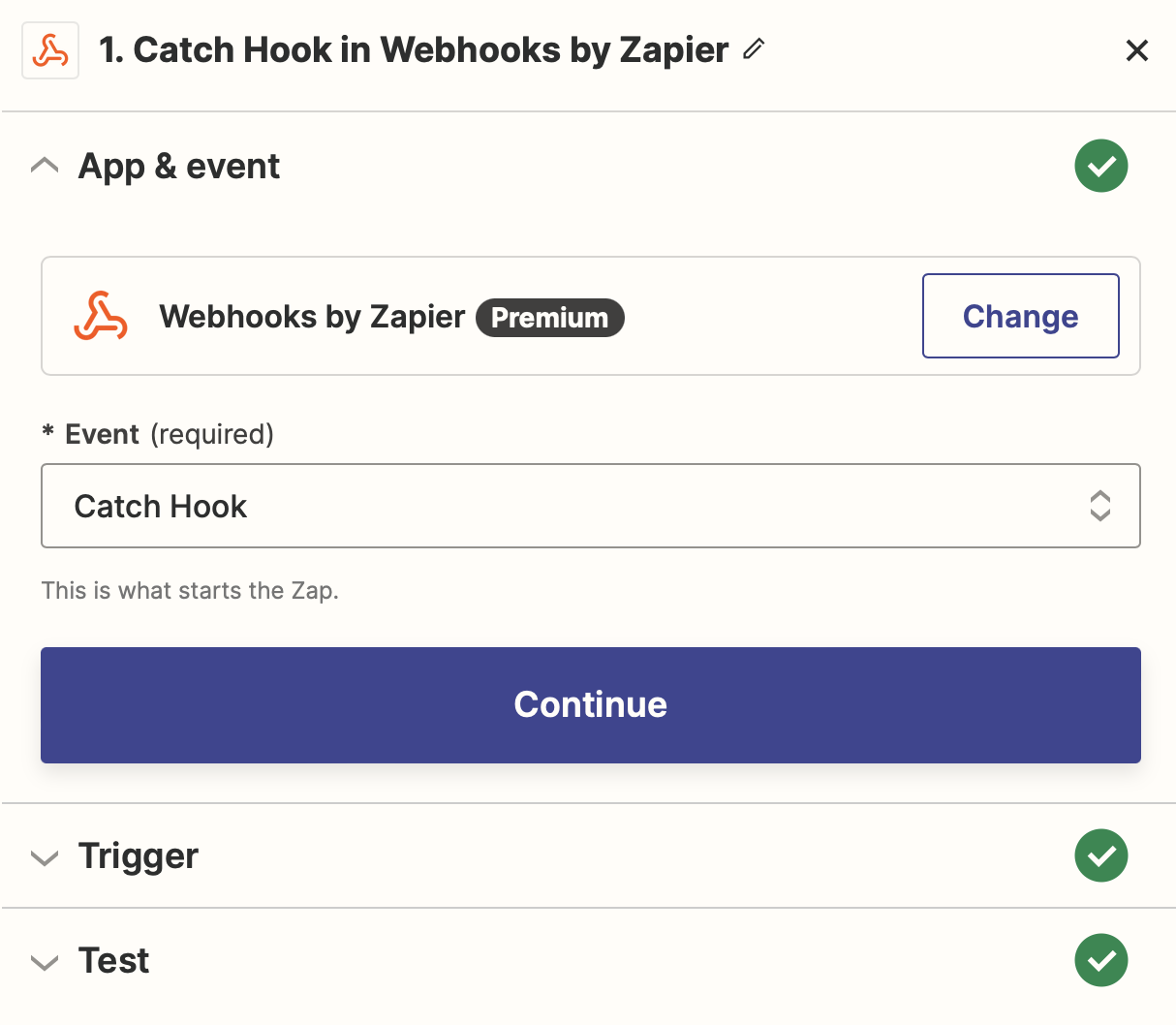
I denne Zap skal du velge Webhooks by Zapier. Denne skal settes på Catch hook.
Gå til Arbeidsflyt på Bookingtjeneste.no. Sett opp en ny arbeidsflyt ved for eksempel Ny booking. Velg Send HTTP(S) request for denne arbeidsflyten.
Rediger din arbeidsflyt.
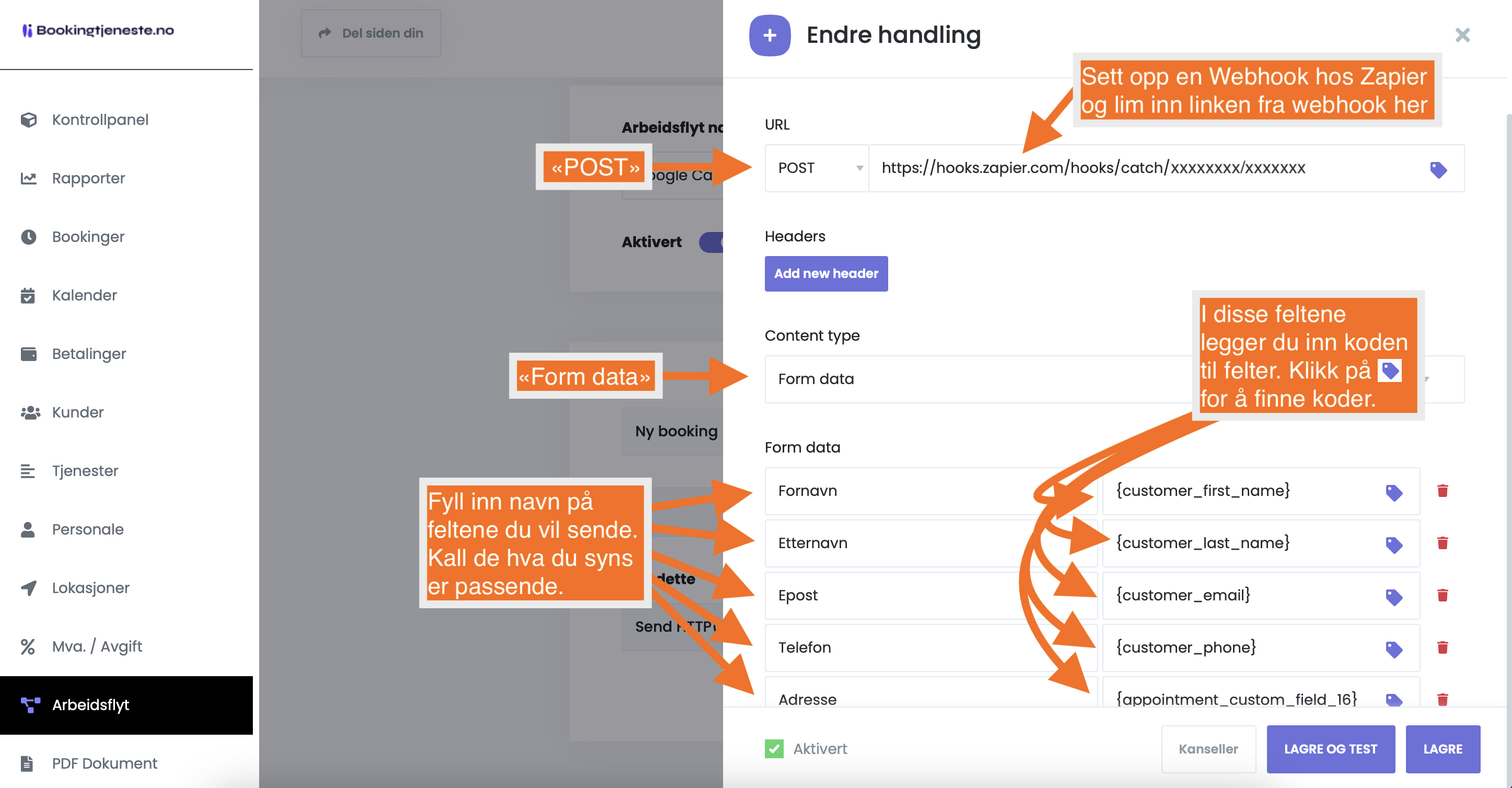
- URL: POST (Benytt linken du mottar fra Zapier, og lim inn i URL-feltet)
- Content type: Form data
- Form data: Fyll inn så mange felter du selv ønsker. Venstre felt kan for eks. være First name og deretter koden til fornavn i høyre felt.
5 Then connect your Zap to the selected applications.
NB. Du kan også benytte JSON. Da må du velge JSON under Content type. Skriv i følgende format ved bruk av JSON. Eksempel:
{

  "Kunde": {

    "Fullt navn": "{customer_full_name}",

    "Epost": "{customer_email}",

    "Telefon": "{customer_phone}"

  },

  "Booking": {

    "Dato": "{appointment_date}",

    "Tid": "{appointment_start_time}"

  }

}
Illustrasjon fra Bookingtjeneste.no og oppsett av webhook
Illustrasjon fra Zapier.com og innstillinger for oppsett av webhook
Important: When using webhooks, the following criteria must be followed:
- Du må ha et abonnement hos en leverandør som støtter webhooks. Vi anbefaler Zapier.com.
- Hvis du legger inn en booking fra ditt kontrollpanel (altså ikke fra bookingpanelet på din link), så MÅ alle obligatoriske felter fylles ut for at en webhook skal sendes.
Do you need help setting up a Webhook?
Contact us for guidance if you get stuck. Since the setup is a time-consuming process, we cannot set up the entire process for you. However, we are happy to help with any questions. Send an email to post@bookingtjeneste.no
Test your webhook
Do you want to test it easily?
Set up a webhook and use the URL you get on this website below. You will then be able to receive information on the test page.
Test her: https://webhook.cool
Connect the system to countless systems
You can connect your booking system to thousands of systems via webhook. Examples of systems include:
Slack
GitHub
Google Sheets
Google Drive
Trello
Asana
Microsoft Teams
Dropbox
WordPress
Mailchimp
Zendesk
Salesforce
Airtable
Basecamp
Stripe
PayPal
JIRA
Discord
Google Calendar
Facebook Pages
HubSpot
LinkedIn Lead Gen Forms
Zoho CRM
Freshdesk
Gmail
Google Forms
Redmine
Pipedrive
Mailgun
SendGrid
AWS Lambda
Box
Twilio
Bitbucket
Google Tasks
WooCommerce
SurveyMonkey
Google Analytics
Microsoft Office 365
Evernote
ClickUp
Typeform
OneDrive
ActiveCampaign
Wix
Intercom
FreshBooks
Podio
Smartsheet
Constant Contact
MailerLite
Microsoft Outlook
Drip
Infusionsoft
ConvertKit
Microsoft Dynamics 365
Todoist
Docusign
Adobe Creative Cloud
Real Estate Webmasters
Magento
Etsy
Flickr
Wunderlist
Confluence
Google Classroom
Oracle
SAP
RSS
Microsoft OneNote
SugarCRM
BigCommerce
GitLab
Buffer
Zoho Mail
Facebook Messenger
MySQL
PostgreSQL
QuickBase
Microsoft Azure
Webflow
Square
Braintree
Volusion
Chargebee
Recurly
Bing Ads
AppFolio
Quickbooks Online
Cisco Webex (Webinar and online meetings)
commerce)
MailerLite (Email Marketing)
FreshBooks (Invoicing and Accounting)
Podio (Project Management)
Smartsheet (Project Management)
Does the booking service have an API?
We do not offer an API. However, the system can send webhooks to e.g. Zapier for specific events in the booking service. Included in Pro subscriptions.